
.jpeg?w=800&h=800)
.jpeg?w=800&h=800)
.jpeg?w=800&h=800)
-0.jpeg?w=800&h=800)
.jpeg?w=800&h=800)
.jpeg?w=800&h=800)
-0.jpeg?w=800&h=800)
Upgrade your connectivity with the FTDI Chip USB to RS485 Wire End UART Serial Converter Cable. 6ft length, USB2.0 AM to 6C open wires for seamless legacy to modern device connections!
6ft FTDI USB to RS485 Open Wire End TTL Serial Converter Cable: Revolutionizing Legacy Device Connectivity
In today's fast-paced digital landscape, the challenge of integrating legacy serial devices with modern USB - enabled computers is a common hurdle. The 6 foot (1.8meter) FTDI USB to RS485 Open Wire End TTL Serial Converter Cable rises to the occasion, offering a seamless and reliable solution for this connectivity conundrum.
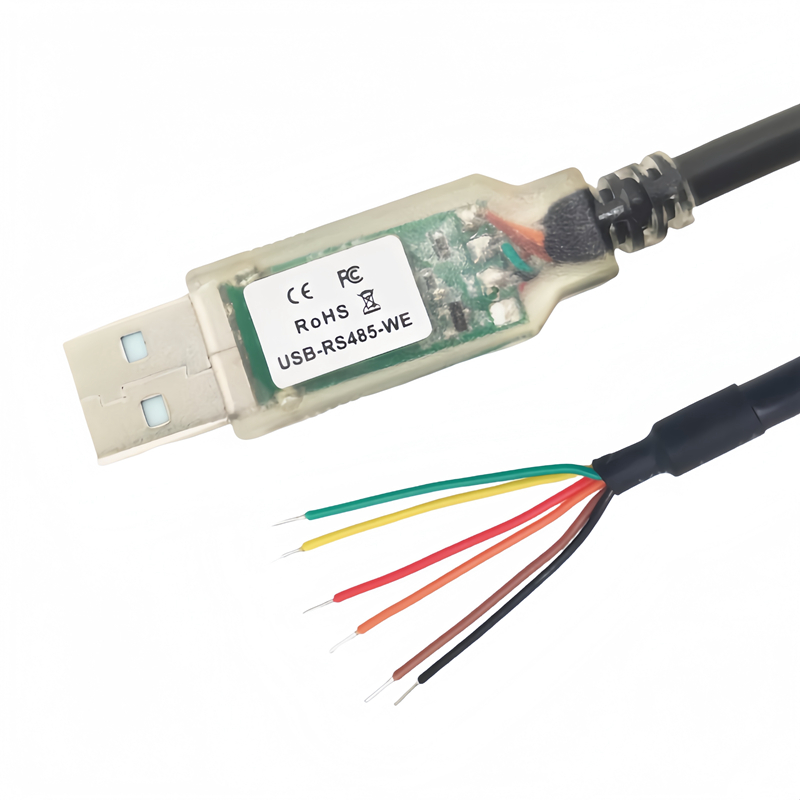
This industrial-grade cable, identified by the model USB-RS485-WE-1800-BT, is designed to bridge the gap between legacy DB-9 serial communication devices and contemporary computers. Available in sleek black or clear color options, it combines aesthetics with robustness, suitable for a wide range of industrial and general-use environments.
Key Features
1. Premium Chipset for Unmatched Compatibility
At the heart of this cable is the FTDI FT232RQ Chipset, a cornerstone of the industry. Renowned for its reliability and broad compatibility, this chipset, along with its dedicated device drivers, ensures seamless operation across a vast array of operating systems. Whether you're using Windows XP, 7, 8, 10, 11, Mac OS, Linux, Android, or Vista, this cable is engineered to deliver consistent performance.
2. Flexible and Adaptable Design
The 6 - foot cable length provides the necessary flexibility for device placement, allowing users to connect devices at a comfortable distance. The USB2.0 AM to 6C open wire end design is a game - changer. It empowers users to customize the connector type at the wire end, enabling effortless connection to diverse serial ports. This adaptability makes it an ideal choice for various applications, from industrial automation to home - based projects.
3. Visual Data Monitoring
The transparent USB connector is equipped with integrated TXD/RXD LEDs. These LEDs serve as a real - time visual indicator of data traffic, offering users immediate insights into the data flow. Whether you're troubleshooting a connectivity issue or simply monitoring the performance of your system, these LEDs provide valuable feedback at a glance.
4. Comprehensive Signal Support
The cable offers full support for RS-485 level UART data signals. The color - coded wires are carefully designed to simplify the connection process:
- RXD (Yellow): Dedicated to receiving data, ensuring smooth and efficient data intake.
- TXD (Orange): Responsible for transmitting data, enabling seamless communication between devices.
- GND (Black): Serves as the ground connection, providing electrical stability.
- RTS (Green): Facilitates the request - to - send function, optimizing data transfer.
- CTS (Brown): Manages the clear - to - send signal, ensuring proper data flow control.
- +5V/3v3 (Red): Supplies power, supporting both 3.3V and 5V devices.
In addition, it supports standard Windows baud rates ranging from 300bps to 921.6Kbps. The UART interface is highly configurable, supporting 7 or 8 data bits, 1 or 2 stop bits, and a variety of parity options, including odd, even, mark, space, or no parity. This versatility allows for precise customization according to the specific requirements of different devices.
5. Advanced Handshaking Mechanisms
The cable features both fully assisted hardware (RTS#/CTS#) and X - On/X - Off software handshaking. These advanced handshaking mechanisms ensure reliable and error - free data transfer between the legacy device and the modern computer. Moreover, it is USB 2.0 Full Speed compatible, guaranteeing high - speed data transmission to meet the demands of today's data - intensive applications.
Customization Options
Recognizing that every project may have unique requirements, the manufacturer offers custom versions of this cable upon request. Whether you need a different cable length, specific connector types, or specialized signal configurations, the ability to customize ensures that the cable can be tailored to your exact needs.
In conclusion, the 6ft FTDI USB to RS485 Open Wire End TTL Serial Converter Cable is a powerful and versatile solution for connecting legacy serial devices to modern computers. Its combination of high - quality components, flexible design, and advanced features makes it an essential tool for anyone looking to integrate legacy technology into the modern digital ecosystem.
Here's a step by step guide on how to use the 6ft FTDI USB to RS485 Open Wire End TTL Serial Converter Cable:
1. Prerequisites
- Check Compatibility: Ensure that your legacy DB - 9 serial device is compatible with the RS485 protocol. Also, verify that your modern computer has a USB port and runs an operating system supported by the cable, such as Windows XP, 7, 8, 10, 11, Mac OS, Linux, Android, or Vista.
- Install Drivers:
- Windows:If it's the first time using the cable, Windows may automatically detect the device and attempt to install the necessary drivers. However, for optimal performance, it's recommended to download and install the FTDI device drivers from the official FTDI website. After downloading, run the installer and follow the on - screen instructions.
- Mac OS: Similar to Windows, the system may try to recognize the device. If not, visit the official FTDI website to download and install the appropriate drivers.
- Linux: In many cases, Linux has built - in support for FTDI devices. But you might need to add your user to the relevant group (e.g.,
dialout) to have the necessary permissions. You can do this by running the commandsudo usermod -a -G dialout <your_username>in the terminal and then logging out and logging back in.
2. Physical Connection
- Connect to the Computer: Plug the USB2.0 AM connector of the cable into an available USB port on your modern computer.
- Connect to the Legacy Device:
- Identify the appropriate pins on your legacy DB - 9 serial device that correspond to the RS485 signals. Refer to the device's documentation if necessary.
- Match the color - coded wires of the cable to the corresponding pins on the legacy device:
- Connect the yellow RXD wire to the receive pin on the legacy device.
- Connect the orange TXD wire to the transmit pin on the legacy device.
- Connect the black GND wire to the ground pin on the legacy device to ensure electrical stability.
- If your legacy device supports hardware handshaking, connect the green RTS wire to the request - to - send pin and the brown CTS wire to the clear - to - send pin.
- Connect the red +5V/3v3 wire to the appropriate power - supply pin on the legacy device, depending on whether it requires 3.3V or 5V.
3. Software Configuration
- Open Serial Communication Software:
- Windows: Popular options include PuTTY, Tera Term, or RealTerm. Install the software if you haven't already.
- Mac OS: CoolTerm or the built - in
screencommand in the terminal can be used. - Linux: Minicom or
screenare commonly used for serial communication.
- Configure Serial Settings:
- Baud Rate: Set the baud rate in the serial communication software to match the baud rate of your legacy device. Common baud rates are 9600, 115200, etc. The cable supports standard Windows baud rates ranging from 300bps to 921.6Kbps.
- Data Bits, Parity, and Stop Bits: Configure these parameters according to the requirements of your legacy device. The UART interface of the cable supports 7 or 8 data bits, 1 or 2 stop bits, and various parity options (odd, even, mark, space, or no parity).
- Select the COM Port (Windows) or Device File (Mac OS/Linux):
- Windows: In the serial communication software, select the appropriate COM port that the cable is assigned to. You can find the COM port number in the Device Manager under "Ports (COM & LPT)".
- Mac OS: The device file is usually something like
/dev/tty.usbserial - <serial_number>. You can find it in the Terminal by running the commandls /dev/tty.*. - Linux: The device file is typically
/dev/ttyUSB0or similar. You can check the available serial devices using the commandls /dev/ttyUSB*.
4. Testing the Connection
- Send and Receive Data:
- Once the settings are configured correctly, you can start sending and receiving data between the legacy device and the modern computer. In the serial communication software, type text or commands to send data to the legacy device, and any data received from the device will be displayed in the software's terminal window.
- Monitor the LEDs:
- Observe the TXD/RXD LEDs on the transparent USB connector. When data is being sent, the TXD LED should blink, and when data is being received, the RXD LED should blink. This visual indication can help you verify that data is flowing correctly.
5. Troubleshooting
- Check Connections: If you're having trouble establishing a connection or sending/receiving data, double - check all the physical connections to ensure they are secure and properly matched.
- Verify Settings: Make sure that the serial settings in the software (baud rate, data bits, parity, stop bits) are correct and match the requirements of your legacy device.
- Driver Issues: If the computer fails to recognize the cable, reinstall the FTDI drivers or check for driver updates on the official website.